How I Scraped Data From Eex
May 2025 (1276 Words, 8 Minutes)
While building my Clean Spark Spread Dashboard (check it here), I needed up-to-date natural gas spot prices. I wanted a free, automated way to pull this data — and ended up trying to scrape it from the EEX website: https://www.eex.com/en/market-data/market-data-hub/natural-gas/spot.
Of course, it wasn’t as easy as I expected: basic methods based on Python’s modules requests and BeautifulSoup did not appear to work properly, and I’m far from being an expert in web scraping. But after some trial and error, I found a reliable (if not perfect) solution using Selenium. Since several people asked me how I did it, I’m sharing the full method and code in this post.
Pre-requisites
I used:
- Selenium for browser automation
- Pandas for data manipulation
- ChromeDriver (or another browser driver) installed for Selenium to work
- Optional:
logginganddatetimeto keep track of script execution and saved files
Setting Up Selenium
The first step is to set up Selenium by importing the necessary functions:
from selenium import webdriver
from selenium.webdriver.chrome.options import Options
from selenium.webdriver.common.by import By
from selenium.webdriver.support import expected_conditions as EC
from selenium.webdriver.support.ui import WebDriverWait
Then, specify the Chrome options:
options = Options()  # creates a ChromeOptions object to customize how Chrome behaves
options.add_argument("--headless")  # runs Chrome without opening a visible window
options.add_argument("--no-sandbox")  # disables Chrome’s security sandboxing features
options.add_argument("--disable-dev-shm-usage")  # avoids Chrome using /dev/shm (shared memory)
Calling the driver:
# Necessary to have chromedriver installed (in the same folder or in PATH)
driver = webdriver.Chrome(options=options)
Connecting to the Page
The data can be found at EEX Natural Gas Spot Market. There is a table, updated every day, which contains prices for different spot products (TTF, NBP, PEG…).
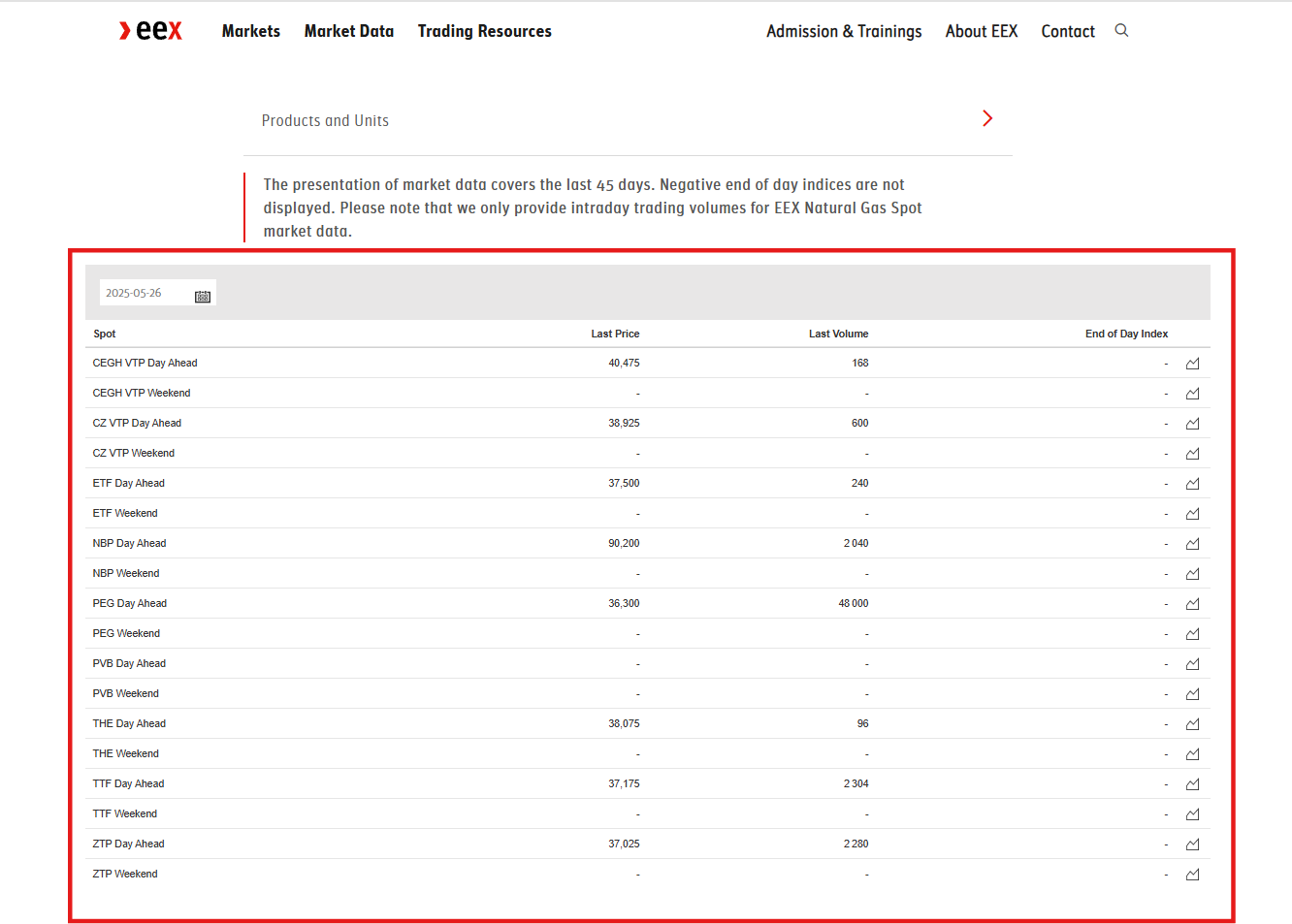
I started by connecting to the page:
driver.get("https://www.eex.com/en/market-data/market-data-hub/natural-gas/spot")
Then, I had to identify the correct location of the table. To do that, right-click on the page and select “Inspect”. It opens the DOM (Document Object Model), where you can locate the exact HTML element that contains the table. When you hover over the lines in the DOM, it will highlight the corresponding element in the page.
Once you have done that, right-click on the table element and choose “Copy full XPath” ("/html/body/main/div[2]/div/div/div[2]/div/table" in this case).
I used XPath to locate the table, but if you’re maintaining this long-term, it’s safer to use a class name or other attribute if available. XPath is sensitive to layout changes.
Extracting the Table and Saving to CSV
table_xpath = "/html/body/main/div[2]/div/div/div[2]/div/table"
table_element = wait.until(
    EC.presence_of_element_located((By.XPATH, table_xpath))
)
html_string = driver.execute_script(
    "return arguments[0].outerHTML;", table_element
)

# To ensure correct formatting of captured values
html_string = html_string.replace("\u202f", "")

# Create CSV file
df = pd.read_html(StringIO(html_string), decimal=",", thousands=" ")[0]
df.to_csv(output_file, index=False)
You may note in the code just above that I added two things:
- I used
"wait"to be sure the content of the table has been rendered before collecting it. - I added this line:
html_string = html_string.replace("\u202f", "")to correct the format of the extracted data.
You can now schedule this script to run daily (e.g. with Windows Task Scheduler or a cron job) and build a historical database.
Potential Pitfalls
In the end, it’s not very complex to get the data, but you can only collect data for the current day, so it will take time to create a solid database (that’s why I only have data from April 2025 in my projects). For natural gas spot prices, you can find data going back 45 days, but you’ll have to collect each data point manually.
Also, keep in mind that the EEX layout might change — and when it does, the script will likely break.
Eventually, you might run into anti-bot issues. EEX doesn’t usually throw captchas at light scraping, but if you’re making too many requests or acting too much like a robot, you could get blocked. Play nice: add pauses and avoid hammering their servers.
Full Code
You’ll find my scraper function below. I’ve also added a try/except block in case EEX asks you to accept cookies.
# gas_price_scraper.py

import logging
import os
import time
from datetime import datetime
from io import StringIO

import pandas as pd
from selenium import webdriver
from selenium.webdriver.chrome.options import Options
from selenium.webdriver.common.by import By
from selenium.webdriver.support import expected_conditions as EC
from selenium.webdriver.support.ui import WebDriverWait


# We'll use this function to scrap gas spot prices from eex
def fetch_gas_price_table(timestamp=None, save_path="data/eex-gas-prices"):

    # Each file will be named based on the date of scrapping
    if timestamp is None:
        timestamp = datetime.today().strftime("%Y-%m-%d")
    os.makedirs(save_path, exist_ok=True)
    output_file = os.path.join(save_path, f"eex_gas_prices_{timestamp}.csv")

    # options for selenium
    options = (
        Options()
    )  # creates a ChromeOptions object to customize how Chrome behaves
    options.add_argument("--headless")  # Runs Chrome without opening a visible window.
    options.add_argument(
        "--no-sandbox"
    )  # Disables Chrome’s security sandboxing features
    options.add_argument(
        "--disable-dev-shm-usage"
    )  # Avoids Chrome using /dev/shm (shared memory)

    # Necessary to have chromedriver installed (in the same folder or in PATH)
    driver = webdriver.Chrome(options=options)
    driver.get("https://www.eex.com/en/market-data/market-data-hub/natural-gas/spot")
    wait = WebDriverWait(driver, 15)

    try:

        # in case we should accept cookies
        accept_button = wait.until(
            EC.element_to_be_clickable(
                (By.XPATH, "//button[contains(text(), 'I ACCEPT ALL COOKIES')]")
            )
        )
        accept_button.click()
        logging.info("Accepted cookies")
        time.sleep(2)
    except Exception:
        logging.info("No cookie popup detected")

    try:
        # xpath to the table and collect elements
        table_xpath = "/html/body/main/div[2]/div/div/div[2]/div/table"
        table_element = wait.until(
            EC.presence_of_element_located((By.XPATH, table_xpath))
        )
        html_string = driver.execute_script(
            "return arguments[0].outerHTML;", table_element
        )
        # to ensure a correct format of values captures
        html_string = html_string.replace("\u202f", "")

        # creation of csv file
        df = pd.read_html(StringIO(html_string), decimal=",", thousands=" ")[0]
        df.to_csv(output_file, index=False)
        logging.info(f"Gas price table scraped and saved to {output_file}")

    except Exception as e:
        logging.error(f"Failed to extract gas price table: {e}")

    finally:
        driver.save_screenshot("data/final_view.png")
        driver.quit()

    return output_file